
3D Printing Manufacturing: When to Prototype vs Produce
3D printing has matured from a prototyping tool into a legitimate manufacturing option, but the decision to “keep iterating” versus “start producing” is where many teams lose time and margin. In practice, 3D printing manufacturing succeeds when you treat prototyping and production as two different jobs, with different requirements for documentation, quality control, and economics.
This guide breaks down when to prototype vs produce, what changes when you move into production, and how to build a repeatable path to end-use parts.
Prototyping vs production in 3D printing manufacturing (what’s actually different)
In early stages, you are usually optimizing learning speed. In production, you are optimizing repeatability and risk.
A prototype is “successful” if it answers a question:
- Does it look right (form)?
- Does it assemble (fit)?
- Does it survive the loads and environment (function)?
A production part is “successful” if it consistently meets a spec:
- Dimensions and tolerances across multiple builds
- Cosmetic expectations (surface, color, layer visibility)
- Strength in the required directions
- Post-processing consistency
- Lead time and cost predictability
Those differences drive almost every downstream decision: material choice, print orientation, finishing, inspection, packaging, and even how you name and version files.
A quick decision matrix: when to prototype vs when to produce
Use this table as a first-pass filter. It does not replace engineering judgment, but it helps you identify which direction your project naturally wants to go.
| Question | If “yes”, you’re likely still prototyping | If “yes”, you’re likely ready to produce |
|---|---|---|
| Are you still changing geometry every 1 to 3 builds? | Yes | No |
| Is the goal learning (fit checks, usability feedback, visual reviews)? | Yes | No |
| Do you need only a few units for evaluation, photos, or investor demos? | Yes | No |
| Do you have a locked CAD version, with controlled revisions? | No | Yes |
| Are requirements documented (tolerances, finish, strength, environment)? | No | Yes |
| Do you need consistent outcomes across batches and reorders? | Not yet | Yes |
| Does each unit need personalization or frequent variation? | Sometimes | Often (good fit for additive production) |
Three prototype types (and what they are for)
Many teams get stuck because they are trying to make one print answer every question. In 3D printing manufacturing, it is usually faster and cheaper to run prototypes in stages.
Form prototypes (look, feel, and stakeholder alignment)
Form prototypes prioritize appearance and ergonomics. Typical uses include:
- Enclosure size and hand feel
- Display models for trade shows
- Photography and sales samples
At this stage you can often accept looser tolerances, simplified internals, or cosmetic finishing focused on the “hero” surfaces.
Fit prototypes (assemblies and interfaces)
Fit prototypes validate:
- Screw bosses, snaps, clips, and clearances
- Mating parts and alignment
- Cable routing, connectors, and internal volume
If you are sending files to a print service, this is where printability details matter most (wall thickness, overhang behavior, and assembly clearances). If you want model-prep tips, Firecloud Printz has a dedicated guide on choosing a 3D model for 3D printer success.
Function prototypes (strength, heat, wear, chemical exposure)
Function prototypes test the part in real conditions. This is where you start paying attention to:
- Material properties and temperature limits
- Anisotropy (direction-dependent strength)
- Wear surfaces, threads, press fits
- Long-term creep or fatigue
If function testing is still producing failures that require geometry changes, you are prototyping. If failures are gone and you are validating a known spec, you are approaching production.
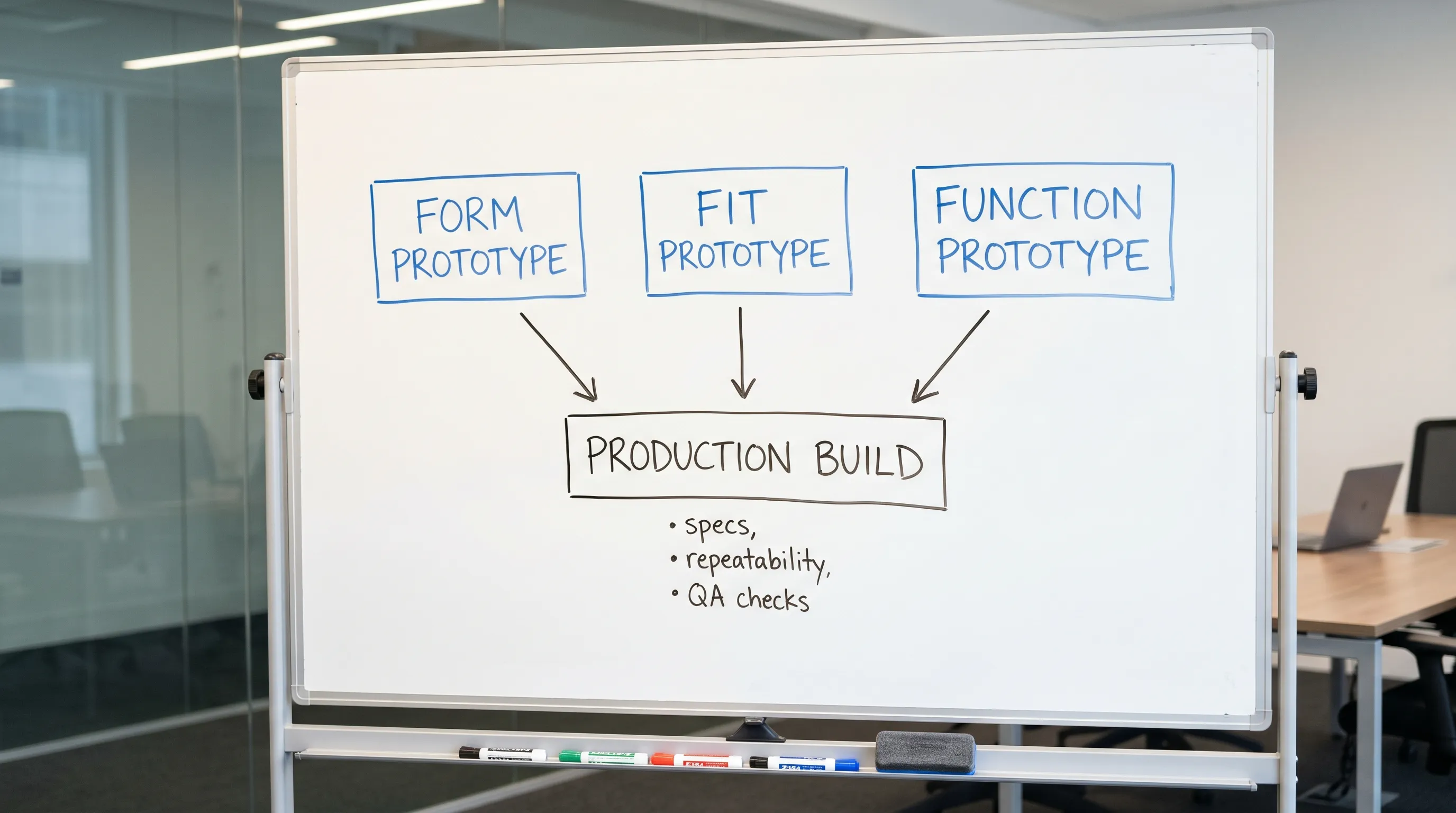
The biggest switch when you move from prototype to production: process control
The hidden cost in additive manufacturing is variability. Two parts can look identical and still behave differently if the process is not controlled.
When you decide to “produce,” add these controls:
1) Lock the definition of the part
Production requires a stable definition of what you are making.
- Freeze a CAD revision (and track changes)
- Define critical dimensions and acceptable tolerances
- Define cosmetic requirements (what is acceptable, what is rejectable)
This is also where file formats and scale consistency matter. If your team is still bouncing between exports, review the practical workflow in How to Use a 3D Printer: A Beginner-Friendly Workflow.
2) Choose the “manufacturing process,” not just the printer
In additive, “process” includes settings and downstream steps. For a production-ready approach, document:
- Material and color
- Layer height and key slicer settings that affect strength and surface
- Orientation rules (because strength and surface quality change with orientation)
- Support strategy and support-contact expectations
- Post-processing steps (support removal, sanding, curing, coating)
3) Define inspection and acceptance criteria
A production part needs a pass/fail definition. Common approaches:
- Measure a small set of critical dimensions on every part (or a sample rate per batch)
- Visual checks against reference photos for cosmetics
- Simple functional gauges (does it fit? does it clip? does it seal?)
If you do not define these criteria, you end up re-litigating quality on every reorder.
Cost realities: why prototyping is “cheap” and production can get expensive fast
3D printing is famous for low setup cost, but production economics depend on labor and time.
In prototyping, you are typically paying for:
- One-off setup decisions
- Print time
- Minimal finishing
In production, costs shift toward:
- Consistent post-processing labor (often the biggest driver)
- Rejects and reprints (if your design or process is marginal)
- Packaging and handling
- Batch management and lead-time planning
If the part requires extensive manual finishing to meet cosmetic expectations, 3D printing manufacturing can still be the right choice, but you should treat finishing as part of the process, not a “nice to have.”
When 3D printing is the right production method (not just a bridge)
3D printing manufacturing is strongest when one or more of the following are true:
You need low to medium volumes without tooling
If your demand is uncertain, tooling-heavy methods can force you to commit too early. Additive lets you produce in smaller batches and adjust as you learn.
Your product benefits from customization
Personalization is where additive shines, because changing geometry does not require new tooling. Examples include:
- Customer-specific fit
- Custom labels, logos, or names
- Configurable accessories
Geometry would be difficult or expensive otherwise
Additive can reduce assemblies, integrate features, and enable internal channels or complex forms that are hard to machine or mold.
You need fast iteration without stopping production
Some businesses keep producing while they iterate, using strict revision control (for example, producing Rev B while testing Rev C). That is still “production,” but only if you can track and separate versions.
When you should stop trying to “produce” with 3D printing
A clear sign you are forcing the wrong method is when your constraints are dominated by one of these:
Unit cost must drop sharply at higher volume
If demand is stable and high, traditional manufacturing may win on unit economics. Even if 3D printing is technically capable, the per-part cost may not scale the way you need.
Tight tolerances across large mating surfaces are non-negotiable
Additive can be accurate, but maintaining extremely tight tolerances across broad surfaces, especially across multiple batches, may push you toward machining or molding (or a hybrid approach where printed parts are post-machined).
Cosmetic requirements are “consumer perfect” at scale
If you need flawless, uniform surfaces with minimal visible artifacts on thousands of units, you may spend more on finishing than on printing.
In these cases, 3D printing can still add value, but often as:
- A prototyping method
- A bridge manufacturing method before tooling is ready
- A way to produce jigs, fixtures, and internal tools
For a broader look at business use cases beyond prototyping, see Additive Manufacturing 3D Printing: What Businesses Use it For.
A practical readiness checklist for production builds
Before you place a “production” order, align your team on these points. This reduces rework and helps a print partner quote accurately.
Part definition and documentation
- CAD and exported file match the same revision
- Units and scale are confirmed
- Critical dimensions and acceptable tolerances are documented
- Assembly intent is clear (what must fit with what)
Performance requirements
- Required strength and load direction are stated
- Environment is stated (heat, UV, water, chemicals)
- Expected lifecycle is stated (temporary, seasonal, long-term)
Surface and finishing expectations
- Target surface quality is defined (example photos help)
- Visible faces are defined (so orientation and supports can be planned)
- Finishing steps are agreed (and budgeted)
Order planning
- Batch size and delivery cadence are defined
- Packaging and labeling needs are defined
- A plan exists for handling revisions without mixing versions
Don’t skip IP and licensing when you move into production
When a prototype becomes a sellable product, you are no longer just “testing a concept.” You are creating an asset that can be copied, misused, or distributed without authorization.
A few common scenarios:
- You sell a product based on a design you commissioned and need clear ownership terms
- You collaborate with a designer and need licensing terms for commercial production
- Your product shows up on marketplaces, copied by a third party
If protecting or monetizing rights is part of your growth plan, it can be worth talking to specialists focused on monitoring, enforcement, and licensing. For example, IP enforcement and licensing support from Third Chair is designed to help rights-holders protect and unlock revenue from their work.
(As always, this is not legal advice, but a reminder to treat IP as part of “production readiness,” not an afterthought.)
How to communicate with a 3D printing manufacturing partner (to avoid surprises)
Most production issues come from misaligned assumptions. A good production request answers:
- What the part is for (prototype evaluation vs end-use sale)
- Which dimensions are critical
- Which surfaces are customer-facing
- What material constraints exist (strength, heat, flexibility)
- Whether you want the fastest turnaround or the most consistent cosmetics
If you are not sure how to translate your model into a reliable print, Firecloud Printz’s overview on additive printing materials, uses, and benefits can help you frame the right constraints without over-specifying.
Frequently Asked Questions
When does a prototype become “production”? A prototype becomes production when the design is stable, requirements are documented, and you need repeatable results across batches, not just learning from the next iteration.
Is 3D printing manufacturing only for low volumes? It is strongest in low to medium volumes, bridge manufacturing, and customization. For very high, stable demand, other methods may be more cost-effective per unit.
What is the biggest mistake teams make when moving into production? Treating production like “just printing more prototypes.” Production needs process control: locked revisions, documented requirements, and acceptance criteria.
How do I reduce variability between batches? Standardize material, orientation, and key settings, document finishing steps, and define a basic inspection plan for critical dimensions and cosmetic surfaces.
Do I need different files for prototyping vs production? Sometimes. You may add features for manufacturability (clearances, fillets, thicker walls, support-friendly geometry) once you commit to production, even if earlier prototypes were more “idealized.”
Ready to prototype or produce? Firecloud Printz can help you move faster
Whether you are validating your first concept or preparing a repeatable run of end-use parts, Firecloud Printz provides high-quality custom 3D printing with multiple material options, high-detail output, and fast turnaround.
If you already have a model, you can request a quick estimate through the site. If you are unsure whether your project is still in prototyping or truly ready for production, share your goal and constraints, and the team can help you choose a path that matches your timeline and quality needs.
Get started at Firecloud Printz.
